
Installing questions for the Visual Editor for the MCNP5 RSICC distribution (ver. 1.3):
Where is the Linux/UNIX executable?
The Linux/UNIX executable is available with version 1.4
How does the Visual Editor "RUN" MCNP?
When the Visual Editor executable is created, it compiles and links with the MCNP Fortran code so that the memory structures are available to the graphical interface. This means that the Visual Editor has a complete internal copy of MCNP that it uses. The Visual Editor does not run the executable distributed by RSICC. The Visual Editor executable was created with an older version of the Fortran than that distributed in the release of version 5. Because of this, you should not use the Visual Editor to make quality affecting MCNP runs, instead run MCNP outside the Visual Editor.
What is the vised.defaults file?
The vised.defaults file contains the locations of xsdir and the material library files used by the Visual Editor in creating materials and for storing materials in a material library. To create this file in the Visual Editor, go into Data->Materials, and then select Files. After filling in the 5 text entries indicating the location of the material libraries and xsdir, select Apply to create the vised.defaults file. For the default installation, the entries are shown here:
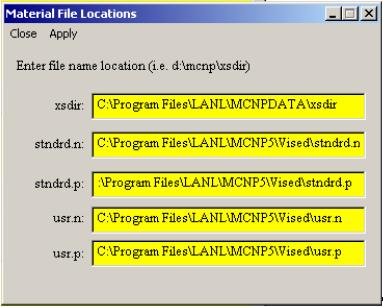
Where should I place the files used by vised.defaults?
Vised.defaults refers to 5 files, 4 material files and xsdir. It is recommended that you create a directory on you computer such as "C:\vislib" to act as your Visual Editor development directory and place the vised.defaults file in this directory The vised.defaults file needs to be in the same directory as the executable.
Where are the material libraries?
The RSICC distribution includes the new material libraries in the vised directory as shown in the figure above.
Where is the vised.defaults file stored?
Typically, this is placed in the same directory as the executable. However, with the RSICC version, for Windows 2000, when you select "Apply" this file is placed in "C:\Documents and Settings\username" where "username" is the name you use to log into the computer. You should place a copy of this file in the Visual Editor working directory created in item 4 above.
How does the Visual Editor access xsdir?
The Visual Editor uses xsdir in two different ways, to run MCNP and to access the cross sections for creating materials.
First it needs xsdir to run the MCNP compiled as part of the Visual Editor. The Visual Editor is running MCNP whenever you do "Run", "Particle Display", "Tally Plots", "Cross section plots", or "3D View". When running MCNP for the above options, xsdir should be placed wherever it needs to be to run MCNP on your system. The RSICC installation should take care of this and place it here (C:\Program Files\LANL\MCNPDATA) by default.
For accessing the cross sections, the xsdir file also must be specified in the "vised.defaults" file as shown above